
Every GitHub account gets a monthly allowance of Actions minutes on GitHub's own machines. For a busy private repository that allowance goes quickly, and the per-minute bill that follows grows with every push. A self-hosted runner moves your CI onto a machine you control: a spare server, a cloud VM, or the workstation already on your desk. The minutes are free, the hardware is your choice, and the runner can reach things GitHub's machines never can, like a staging database on your private network.
This guide takes you from a first runner in ten minutes to a production setup where every job runs in a fresh, throwaway container. Along the way it covers the part most guides skip: doing all of this without handing a stranger the keys to your machine.
Should you self-host at all?
Self-hosting is a trade: you swap a bill for a machine you now look after. It pays off when at least one of these is true.
Reason | What it looks like in practice |
|---|---|
Cost | Your included minutes run out mid-month, or builds are long and frequent. |
Hardware | You need more cores or memory, an ARM machine, a GPU, or a large disk. |
Speed | A runner that sits next to your package registry, or keeps warm caches, finishes far sooner. |
Network access | Jobs must reach something private: an internal database, a staging server, a device on your LAN. |
How a runner thinks
Five ideas explain everything else in this guide.
It is a small program. The open-source actions/runner, installed on your machine.
It calls out; GitHub never calls in. The runner long-polls GitHub over HTTPS asking for work. You open no inbound port, so the machine can sit behind a firewall or NAT.
It registers once with a short-lived token, and then appears under Settings → Actions → Runners.
Labels route the work. A runner carries labels like
self-hosted,linux,x64and any you add. A job'sruns-onlists labels, and it goes to a runner that has all of them.One runner, one job at a time. Two jobs at once means two runners.
A runner is either persistent, taking job after job, or ephemeral, taking exactly one job and then removing itself. Hold on to that distinction; the security story rests on it.
Security: six rules, and why each one exists
A CI job is arbitrary code, whatever the workflow and the repository's scripts say. Assume your runner will eventually run something hostile, and arrange things so the damage stays small.
Rule | What it protects against |
|---|---|
Private repositories only, and block forks | A stranger's pull request running on your machine |
Ephemeral runners | One job planting something that runs in, or reads secrets from, the next |
Isolate the job from the host | A job reading your home directory or your other services |
Never mount the host's Docker socket |
|
Least-privilege tokens, kept on the host | A job minting its own runners or removing yours |
Limit what the runner can reach | A compromised job walking into your production network |
Design for the day a job turns hostile, not the day it behaves. Every rule above costs a few minutes once; skipping any of them can cost a machine.
Before you start
A machine running Linux, macOS or Windows. This guide uses Linux commands. Aim for at least 2 CPUs, 4 GB of memory and 20 GB of disk.
Admin access to the repository, or owner access to the organisation.
Outbound HTTPS to
github.com,api.github.comand GitHub's Actions domains. No inbound ports.For the production setup: Docker on the host, plus
curlandjq.
Part 1: a first runner in ten minutes
The simplest possible setup: a persistent runner straight on a machine. Ideal for learning, or for a private repository only you push to. Move to Part 2 before trusting it with anything important.
Download and verify
In your repository, open Settings → Actions → Runners → New self-hosted runner and pick your OS and architecture. GitHub prints the exact commands for the current version, including a registration token valid for one hour. They look like this:
mkdir actions-runner && cd actions-runner

# Copy the exact version and URL from the GitHub page
curl -o actions-runner-linux-x64-<VERSION>.tar.gz -L \
  https://github.com/actions/runner/releases/download/v<VERSION>/actions-runner-linux-x64-<VERSION>.tar.gz

# Check the download against the SHA-256 GitHub shows
echo "<SHA256>  actions-runner-linux-x64-<VERSION>.tar.gz" | shasum -a 256 -c

tar xzf ./actions-runner-linux-x64-<VERSION>.tar.gz
Register and start
./config.sh --url https://github.com/OWNER/REPO --token <REGISTRATION_TOKEN> \
  --name my-first-runner --labels my-ci --unattended

./run.sh                 # try it in the foreground

sudo ./svc.sh install    # or run it as a service that survives reboots
sudo ./svc.sh start
sudo ./svc.sh status
--labels my-ci adds a custom label on top of the defaults, and --unattended accepts the defaults without prompting. Back in Settings → Actions → Runners, the runner now reads Idle.
Send it a job
name: hello
on: workflow_dispatch
jobs:
  hello:
    runs-on: [self-hosted, my-ci]
    steps:
      - run: echo "Hello from $(hostname)"
Run it from the repository's Actions tab. The job lands on your machine within seconds.
Prefer to watch it done first? This walkthrough sets up a runner in a homelab from scratch:
Part 2: production, with ephemeral runners
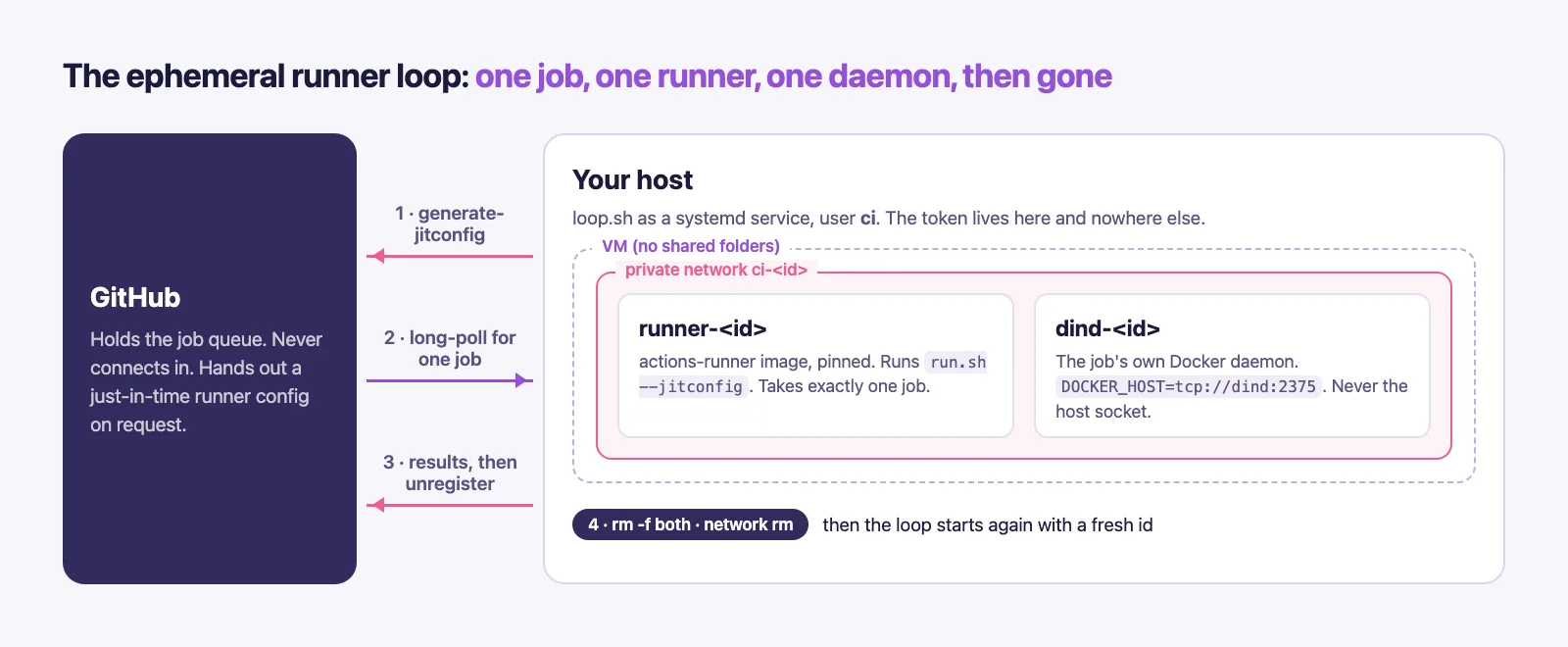
This is the setup for real work. A small loop on the host repeats four steps forever: ask GitHub for a one-job runner, start it in a fresh container with its own Docker daemon, wait for the job to finish, throw everything away.
Step 1: a token that can create runners, and nothing else
Create a fine-grained personal access token (GitHub → Settings → Developer settings → Fine-grained tokens):
Repository access: only the repositories that will use the runner.
Permissions: Repository → Administration: Read and write. For an organisation runner, Organization → Self-hosted runners: Read and write instead.
Expiry: 90 days, with a calendar reminder to rotate it.
For a team, a GitHub App with the same permission is better, since it is not tied to one person's account. Keep the token in a file only the loop's user can read, never in the repository:
mkdir -p ~/.config/ci-runner && chmod 700 ~/.config/ci-runner
printf '%s' 'github_pat_...' > ~/.config/ci-runner/token
chmod 600 ~/.config/ci-runner/token
Step 2: ask for a just-in-time runner
GitHub's API can mint a JIT runner: registered, good for one job, gone afterwards. You get back an encoded configuration and hand it straight to the runner.
curl -sS -X POST \
  -H "Authorization: Bearer $(cat ~/.config/ci-runner/token)" \
  -H "Accept: application/vnd.github+json" \
  -H "X-GitHub-Api-Version: 2022-11-28" \
  "https://api.github.com/repos/$OWNER/$REPO/actions/runners/generate-jitconfig" \
  -d "{\"name\":\"ci-$(date +%s)\",\"runner_group_id\":1,\"labels\":[\"self-hosted\",\"linux\",\"x64\",\"my-ci\"],\"work_folder\":\"_work\"}" \
  | jq -r '.encoded_jit_config'
runner_group_id: 1 is the default group. Use arm64 instead of x64 on an ARM machine, and call /orgs/$OWNER/actions/runners/generate-jitconfig for an organisation runner.
Step 3: run the job in a container
GitHub publishes an official image, ghcr.io/actions/actions-runner. Pin an exact version rather than latest, so an update never changes your CI behind your back.
docker run --rm --name "ci-job-$(date +%s)" \
  ghcr.io/actions/actions-runner:<VERSION> \
  /home/runner/run.sh --jitconfig "$JIT"
Step 4: jobs that need Docker get their own daemon
Many builds run Docker themselves, to build an image or start a test database. Give each job a private Docker daemon on a private network, and point the runner at it:
ID=$(date +%s)
docker network create "ci-$ID"

# The job's own Docker daemon. It needs --privileged, so THIS container
# is the isolation boundary: run all of this inside a VM if the host matters.
docker run -d --privileged --name "dind-$ID" --network "ci-$ID" \
  -e DOCKER_TLS_CERTDIR="" docker:<VERSION>-dind

docker run --rm --name "runner-$ID" --network "ci-$ID" \
  -e DOCKER_HOST="tcp://dind-$ID:2375" \
  ghcr.io/actions/actions-runner:<VERSION> \
  /home/runner/run.sh --jitconfig "$JIT"

docker rm -f "dind-$ID"
docker network rm "ci-$ID"If the image lacks a tool your jobs need, build your own FROM ghcr.io/actions/actions-runner:<VERSION>, install the extras, and end with a step that checks each tool exists. A broken image then fails to build instead of failing jobs later.
Step 5: the loop
Put the pieces together in ~/ci-runner/loop.sh:
#!/usr/bin/env bash
# Ephemeral GitHub Actions runner loop: one fresh runner and one fresh
# Docker daemon per job, cleaned up after each job, forever.
set -euo pipefail

OWNER="your-org"
REPO="your-repo"
LABELS='["self-hosted","linux","x64","my-ci"]'
RUNNER_IMAGE="ghcr.io/actions/actions-runner:<VERSION>"
DIND_IMAGE="docker:<VERSION>-dind"
TOKEN_FILE="$HOME/.config/ci-runner/token"

log() { printf '%s %s\n' "$(date '+%F %T')" "$*"; }

jit_config() {
  curl -sS --fail -X POST \
    -H "Authorization: Bearer $(cat "$TOKEN_FILE")" \
    -H "Accept: application/vnd.github+json" \
    -H "X-GitHub-Api-Version: 2022-11-28" \
    "https://api.github.com/repos/$OWNER/$REPO/actions/runners/generate-jitconfig" \
    -d "{\"name\":\"ci-$1\",\"runner_group_id\":1,\"labels\":$LABELS,\"work_folder\":\"_work\"}" \
    | jq -r '.encoded_jit_config'
}

while true; do
  ID="$(date +%s)-$RANDOM"
  if ! JIT="$(jit_config "$ID")" || [ -z "$JIT" ] || [ "$JIT" = "null" ]; then
    log "could not get a runner configuration; retrying in 60 s"
    sleep 60
    continue
  fi

  docker network create "ci-$ID" >/dev/null
  docker run -d --privileged --name "dind-$ID" --network "ci-$ID" \
    -e DOCKER_TLS_CERTDIR="" "$DIND_IMAGE" >/dev/null

  log "runner ci-$ID waiting for a job"
  docker run --rm --name "runner-$ID" --network "ci-$ID" \
    -e DOCKER_HOST="tcp://dind-$ID:2375" \
    "$RUNNER_IMAGE" /home/runner/run.sh --jitconfig "$JIT" \
    || log "runner ci-$ID exited with an error"

  docker rm -f "dind-$ID" >/dev/null 2>&1 || true
  docker network rm "ci-$ID" >/dev/null 2>&1 || true
  log "runner ci-$ID finished and was removed"
doneStep 6: keep it running with systemd
Create /etc/systemd/system/ci-runner.service, where ci is a dedicated, non-admin user in the docker group:
[Unit]
Description=Ephemeral GitHub Actions runner loop
After=docker.service network-online.target
Wants=network-online.target
Requires=docker.service

[Service]
User=ci
ExecStart=/home/ci/ci-runner/loop.sh
Restart=always
RestartSec=10

[Install]
WantedBy=multi-user.target
sudo systemctl daemon-reload
sudo systemctl enable --now ci-runner
journalctl -u ci-runner -f # follow its logFor more than one job at a time, run several copies as a template unit (ci-runner@1, ci-runner@2), and make sure the machine has the CPU and memory for that many jobs side by side. On Kubernetes, GitHub's Actions Runner Controller does what this loop does, with autoscaling. The loop is the right size for one to a few machines.
Part 3: pointing workflows at the runner
Switch runners without a commit
Store the choice in a repository variable (Settings → Secrets and variables → Actions → Variables; it is not a secret), with GitHub's machines as the fallback:
jobs:
  build:
    runs-on: ${{ vars.CI_RUNNER || 'ubuntu-latest' }}
Set CI_RUNNER to my-ci and jobs come to you; delete it and they go back to GitHub.
Keep forks off your hardware
Even on a private repository, add this guard so a pull request from a fork always runs on GitHub's machines:
jobs:
  build:
    runs-on: >-
      ${{
        github.event_name == 'pull_request'
        && github.event.pull_request.head.repo.full_name != github.repository
        && 'ubuntu-latest'
        || vars.CI_RUNNER
        || 'ubuntu-latest'
      }}
Read it as: a pull request from another repository uses GitHub's machine; otherwise use my runner if one is configured; otherwise GitHub's machine.
Keep jobs inside their limits
permissions:
  contents: read            # least privilege for the job's GITHUB_TOKEN

concurrency:
  group: ci-${{ github.ref }}
  cancel-in-progress: true  # a new push cancels the superseded run

jobs:
  build:
    runs-on: ${{ vars.CI_RUNNER || 'ubuntu-latest' }}
    timeout-minutes: 30     # a hung job frees the runner, not after 6 hours
    steps:
      - uses: actions/checkout@v4
      - run: make test
Part 4: running on a laptop or desktop
A powerful workstation makes a perfectly good runner, with a few precautions.
Always use a VM. Lima, UTM or Multipass on macOS; WSL2 or Hyper-V on Windows. Run Docker and the loop inside it, with no shared folders.
Cap its resources. On a 10-core, 64 GB machine, a VM with 6 CPUs and 8 GB is plenty for typical CI.
Mind sleep. A sleeping laptop takes no jobs;
caffeinate -dimskeeps a Mac awake. Queued jobs simply wait.Watch the load. Your own heavy builds and CI jobs share the same CPU.
Keep the token on the host side, in the VM's start-up script or the macOS keychain.
Day-to-day operations
When | What |
|---|---|
Daily |
|
Monthly | Bump the pinned runner and dind images, rebuild, run one test job. GitHub eventually refuses very old runners |
Every 90 days | New token with the same scope, swap the file, confirm a job runs, delete the old token |
Always | Automatic security updates on the host and VM ( |
The best health signal is the Queued state. Ephemeral runners only appear in Settings while they exist, so an empty list between jobs is normal; jobs sitting in Queued for long are not.
Troubleshooting
Symptom | Likely cause | Fix |
|---|---|---|
Stuck in Queued | No runner has all the labels in | Compare labels letter by letter; one typo is enough |
Stuck in Queued | Runner offline or busy | Check the loop log; add runners for capacity |
| Token lacks Administration: Read and write, or this repository | Recreate the token with the right scope |
| Token expired or revoked | Rotate it |
"Cannot connect to the Docker daemon" |
| Read the dind container's log; it needs |
Exit code 137 | Out of memory | More memory, or fewer jobs at once |
"Lost communication with the server" | Sleep, network drop or overload | Keep it awake, check the network, reduce load |
A step cannot find | Not in the runner image | Add it to your own image, with an existence check |
Billing error on a job | A | Make every path point at your runner, or fix billing |
The checklist
Security
Private repository, and fork pull requests can never reach the runner
Ephemeral runners: one job each, from a JIT configuration
Every job in a fresh container, inside a VM if the host matters
No host Docker socket; a per-job Docker daemon instead
Fine-grained token, scoped, 90-day expiry, never inside a job
The runner reaches only the networks it needs
Setup
Runner and dind images pinned to exact versions
Loop runs as a service under a non-admin user and restarts on failure
Workflows pick the runner through a variable, with a fallback
Every job has
timeout-minutesand leastpermissions
Operations
Monthly image update with one test job
Daily Docker clean-up, and a full-disk guard
Token rotated every 90 days, old one deleted
Someone is told when jobs pile up in Queued
With this in place you have CI that costs nothing per minute, runs on hardware you chose, and keeps every job sealed off from the next one and from the machine underneath it. If you would like a hand designing a CI and DevOps setup like this for your team, talk to us at Techpuvi.